(原创)dify实现@效果
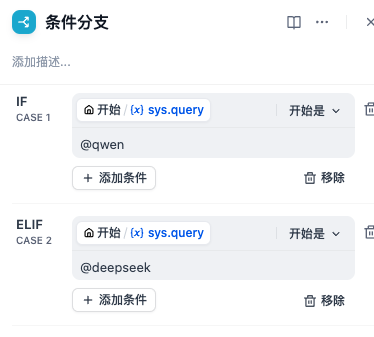
在基础版的dify中,使用基础回话与AI交流。当编制的chatflow非常复杂的时候,我们期望通过@xx助手,实现在chatflow中进行if判断,然后通过不同分支进行响应恢复的效果。但是原生的dify是不支持@的。本文通过魔改添加代码实现基础@效果,适用于1.4.1之前的任何docker版本。之后的版本兴许也适用,但是还没出。
添加@功能操作步骤如下,本文默认你已经通过docker compose安装dify。
1.在volumes/certbot/www 目录下创建haobo56目录,新建diao.js 。内容见代码。
let checkCount = 0;
const maxChecks = 5;

function checkAndBindEvent() {
    const messageInput = document.querySelector('textarea');
    const c_pathname = window.location.pathname;
    console.log(messageInput);
    console.log(c_pathname);
    if (messageInput && c_pathname.startsWith('/chat')) {
        let currentFocus;
        let suggestionsList;

        messageInput.onkeyup = function(e) {
            let val = this.value;
            closeAllLists();
            if (!val) return false;
            currentFocus = -1;

            if (val === '@') {
                suggestionsList = document.createElement('ul');
                suggestionsList.style.position = 'absolute';
                suggestionsList.style.border = '1px solid #ccc';
                suggestionsList.style.backgroundColor = 'white';
                suggestionsList.style.width = '200px';
                suggestionsList.style.listStyleType = 'none';
                suggestionsList.style.padding = '0';
                suggestionsList.style.margin = '0';
                suggestionsList.style.zIndex = '1000';

                for (let user of customer_users) {
                    const item = document.createElement('li');
                    item.textContent = user;
                    item.onclick = function() {
                        replaceAtCursor(messageInput, `@${user}`);
                        closeAllLists();
                    };
                    item.style.padding = '5px';
                    item.style.cursor = 'pointer';
                    item.onmouseover = function() {
                        removeActive(suggestionsList.getElementsByTagName("li"));
                        this.classList.add("active-suggestion");
                    };
                    suggestionsList.appendChild(item);
                }

                document.body.appendChild(suggestionsList);

                // Position the suggestions list at the top-right corner of the textarea
                const rect = messageInput.getBoundingClientRect();
                suggestionsList.style.left = `${rect.left + 30}px`; // Adjust width to match ul width
                suggestionsList.style.top = `${rect.top - 110}px`;

                // Handle arrow keys and enter key within onkeyup event
                if (e.key === "ArrowDown") {
                    currentFocus++;
                    addActive(suggestionsList.getElementsByTagName("li"));
                } else if (e.key === "ArrowUp") {
                    currentFocus--;
                    addActive(suggestionsList.getElementsByTagName("li"));
                } else if (e.key === "Enter") {
                    if (currentFocus > -1) {
                        if (suggestionsList && suggestionsList.getElementsByTagName("li").length > currentFocus) {
                            suggestionsList.getElementsByTagName("li")[currentFocus].click();
                        }
                    }
                }
            } else {
                closeAllLists();
            }
        };

        window.onclick = function(e) {
            if (e.target !== messageInput) {
                closeAllLists();
            }
        };

        function closeAllLists() {
            if (suggestionsList) {
                document.body.removeChild(suggestionsList);
                suggestionsList = null;
            }
        }

        function replaceAtCursor(myField, myValue) {
            const startPos = 0; // Always start at the beginning since we check for '@' at the start
            const endPos = 1;   // End at the position after '@'
            myField.value = myField.value.substring(0, startPos) + myValue + ' ' + myField.value.substring(endPos, myField.value.length);
            myField.selectionStart = myField.selectionEnd = startPos + myValue.length + 1; // Move cursor after the inserted text
            myField.focus();
        }

        function addActive(x) {
            if (!x) return false;
            removeActive(x);
            if (currentFocus >= x.length) currentFocus = 0;
            if (currentFocus < 0) currentFocus = (x.length - 1);
            x[currentFocus].classList.add("active-suggestion");
        }

        function removeActive(x) {
            for (let i = 0; i < x.length; i++) {
                x[i].classList.remove("active-suggestion");
            }
        }

        clearInterval(checkInterval); // Stop checking once the element is found and events are bound
    }else{
            //防止定时搞的浏览器很卡
            checkCount++;
            if (checkCount >= maxChecks) {
            clearInterval(checkInterval); // 达到最大检查次数时停止检查
        }
    }
}

const customer_users = ['小精灵', '大头兵', 'qwen', 'deepseek'];
const checkInterval = setInterval(checkAndBindEvent, 2000);
2.修改nginx模版文件 nginx/conf.d/default.conf.template,见代码,以下代码为新增代码
  location ~ ^/chat {
         proxy_pass http://web:3000;
         add_header xx-job-key "test1";
         proxy_set_header Accept-Encoding "";
         sub_filter '</body>' '<script src="/haobo56/diao.js" async=""></script> </body>';
         sub_filter_once off;
         sub_filter_types *;
         include proxy.conf;
     }

     location /haobo56/ {
       root /var/www/html;
     }
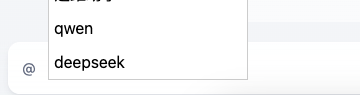
3.之后重启docker compose restart, 在聊天框输入@就看到效果了
4.编排chatflow的时候你可以这样判断了
本文为原创内容:转载请注明出处
https://blog.xuhaobo.cn/%E7%A7%81%E6%9C%89%E5%88%86%E7%B1%BB/75.html